
Best Online Writing Portfolio Platforms for Freelance Writers in 2025
Written by Monica Shaw
Discover the best place to build your online writing portfolio so you can effectively market yourself as a freelance writer.
Every freelance writer needs a professional online presence, but the endless options for building a writing portfolio can feel overwhelming. Should you sign up for a specialized portfolio platform? Wrestle with WordPress? Or just throw your work on Medium and call it a day? (Please don’t do that.)
That’s where this guide comes in. Instead of wading through hours of research, I’ll walk you through the best online portfolio platforms for freelance writers, compare the pros and cons, and help you choose the one that fits your personality and workflow.
Table of Contents
- What Makes a Great Online Portfolio for Writers
- Writer’s Residence (Best All-in-One Choice for Freelance Writers)
- Journo Portfolio (Best for Writers Who Want Automation and a Block Editor)
- Clippings.me (Best for New Freelance Writers on a Mega Budget)
- Authory (Best for Writers Who Publish Regularly Online)
- Copyfolio (Best for Copywriters and Marketing Professionals)
- Generic Website Builders (Squarespace, Wix, WordPress)
- Free Freelance Writing Portfolio Options
- How to Choose the Right Portfolio

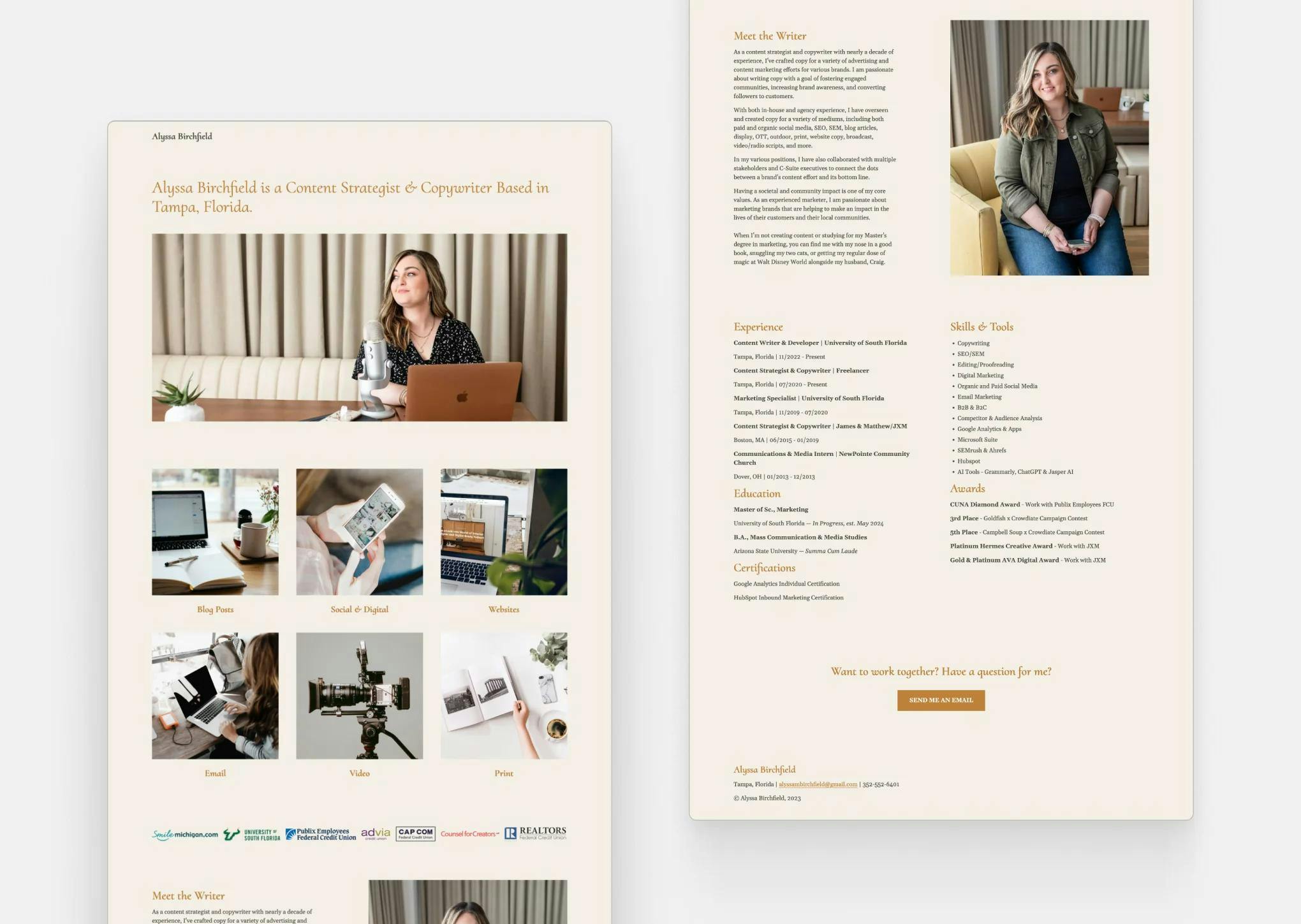
All of the above were build with Writer's Residence. See more Freelance Writing Portfolio Examples and Content Writer Portfolio Examples.
If you don’t want to overwhelm yourself, just read this:
- If you hate working with computers… → Skip straight to Writer’s Residence, where your portfolio can be live in minutes without tech headaches.
- If you want something free… → Head to Clippings.me or Journo Portfolio, both have (albeit limited) free options — or take a chance with a 30-day free trial of Writer’s Residence to explore the difference a full-featured portfolio can make.
- If you want more than a portfolio and don’t mind fiddling with websites… → Jump to Wordpress, Squarespace or Wix where design freedom can come with a learning curve, but you’ll get extensive theme options with blogging features, e-commerce capabilities, and more.
- If you want instant visibility and networking… → Go to Medium, LinkedIn, or Substack for quick publishing and easy sharing. Warning: these aren’t really portfolios, but they are established places to see and be seen.
What Makes a Great Online Portfolio for Freelance Writers?
Unlike designers or photographers, writers don’t need flashy galleries—they need clean, text-friendly layouts that showcase samples professionally.
The essentials of a great writing portfolio:
- Ease of setup so you can launch your portfolio quickly and start using it to network, pitch for work, and apply for gigs; most of us writers would rather be writing than fiddling with tech!
- Professional templates that highlight your writing, not just visuals.
- SEO-friendly to help clients and editors find you.
- Flexibility for different niches (copywriting vs. journalism vs. fiction).
- Ownership, where you control the content with no ads or unwanted logos that distract from YOU.
The wrong platform can waste your time or even turn clients away. The right one makes you look polished and trustworthy—without distracting from your writing.
Specialized Portfolio Platforms for Freelance Writers
Writer’s Residence (Best All-in-One Choice for Freelance Writers)
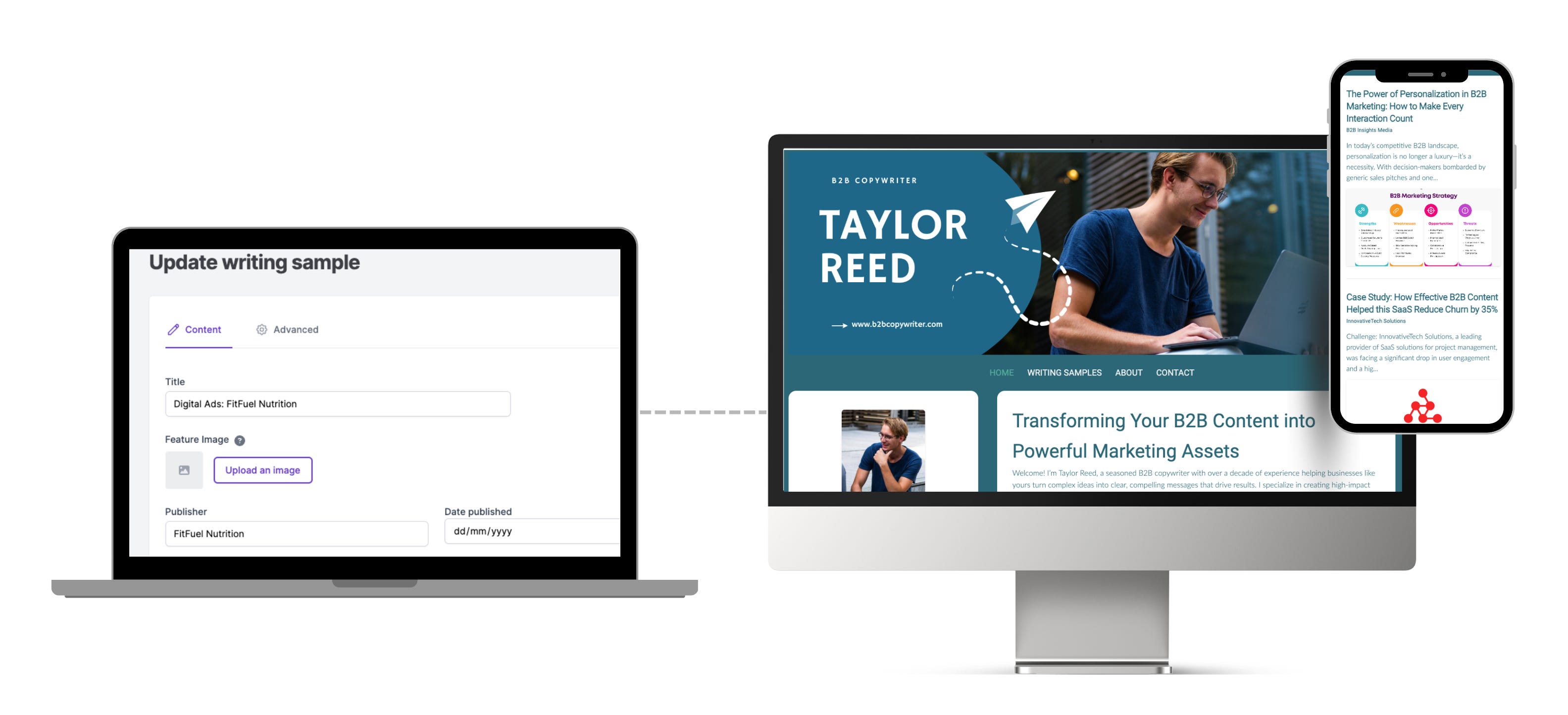
Writer's Residence has a super simple interface so you can create a portfolio and upload writing samples quickly and easily.
When I first started freelancing, I struggled with the same dilemma you’re facing now. WordPress felt clunky, Squarespace was overkill, and PDF resumes weren’t cutting it.
That’s why I built Writer’s Residence: a simple, elegant portfolio builder made for writers. I launched the site in 2008, which makes it one of the longest-standing online writing portfolio platforms out there. We’ve stuck to our core feature set:
- User-friendly templates you can easily customise to match your branding.
- Easily upload and categorise writing samples with no limits on how many you can add.
- Outstanding customer support: reach out for a quick live demo or add on our writing portfolio clinic for hands-on help getting set up.
- SEO features and tooltips with built-in guidance to help your portfolio rank.
- Custom domains & privacy controls at no extra cost — your own domain name looks far more professional than something like janedoe.clippings.me, and unlike many services, Writer’s Residence doesn’t charge extra for this.
- Generous 30-day free trial, then just $9.99/month after that — making it more economical than other writing portfolio offerings.
👉 If you want to skip the tech headaches and focus on landing clients, this is the easiest option. And if you need help, you’ll have direct support from me, the founder — because yes, we’re one of the only platforms where the creator still personally works with users!

View Justin Arnold’s Writer’s Residence portfolio
Journo Portfolio (Best for Writers Who Want Automation and a Block Editor)
What’s a block editor? It’s a design tool that uses individual “blocks” to build posts and pages, allowing you to add, arrange, and customize elements like text, images, and buttons—without touching any code. This drag-and-drop approach has become popular across platforms like WordPress, Squarespace, and yes, Journo Portfolio.

The advantage is greater control over your layout and design. Some writers love that flexibility. Personally, I find it a bit clunky—and often more than I need. By contrast, Writer’s Residence uses a simple, text-based editor so you can focus on content while we take care of the design.
Journo Portfolio offers compelling features for freelance writers. For beginners, there’s a free plan (limited to 10 writing samples and no custom domain). For more experienced writers, it includes automation features—if you regularly publish with a specific outlet, you can use an RSS feed to automatically add new pieces to your portfolio. It even has e-commerce features to sell services or products directly through your site.
Pricing Tiers:
- Free: 10 portfolio items, no custom domain.
- Plus: $5/month (billed annually) or $8/month billed monthly.
- Pro: $8/month (billed annually) or $12/month billed monthly.
- Unlimited: $14/month (billed annually) or $18/month billed monthly.
Overall, Journo Portfolio is a solid choice if you want flexibility and automation. But if you prefer a simpler, content-first experience where design is handled for you, Writer’s Residence might be the smoother path.
Clippings.me (Best for New Freelance Writers on a Mega Budget)
Clippings.me is one of the oldest and most basic portfolio platforms for writers, especially freelance writers and journalists. It lets you upload or link to your articles, which are displayed in a clean, grid-based layout. It’s straightforward and quick to set up, which is part of its charm.

Clippings.me supports a limited set of design and layout options, so your site will tend to look like every other person who uses Clippings.
For new or emerging writers, the free plan is a great way to start gathering clips in one place. However, the free version only allows up to 10 links and doesn’t support a custom domain name. The Premium plan removes those limits and allows unlimited clippings, a custom domain, and analytics.
Pricing Tiers:
- Free: Up to 10 clippings, basic site hosted on clippings.me.
- Premium: $9.99/month or $99/year — unlimited clippings, custom domain, no branding, and Google Analytics.
Clippings.me shines in its simplicity—you can create a professional-looking page in minutes. Where it falls short is in customization and SEO. Every portfolio looks almost the same, and you won’t get much organic search traffic.
If you’re a student, intern, or new journalist who just needs a quick, credible portfolio, Clippings.me works. But if you’re building a long-term freelance writing career, Writer’s Residence offers far more control over your professional brand.
Authory (Best for Writers Who Publish Regularly Online)

Authory is built around one key idea: a self-updating writing portfolio. Once you connect your publications or RSS feeds, Authory automatically imports new articles and adds them to your site. For writers who publish regularly—especially journalists, columnists, or content creators—it’s an incredibly efficient way to keep your portfolio current without any manual updates.
You can also upload pieces manually, create collections, and even make parts of your portfolio private or secure—ideal for ghostwriters or anyone sharing client work that isn’t publicly available. Authory also allows you to back up your writing (so you’ll never lose an article if a publication disappears) and lets readers subscribe to your updates.
That said, Authory is primarily geared toward writers who have publicly published work online. If you’re self-published, just getting started, or your best work exists in print or client files, you might find it less useful. It’s more of a dynamic archive and showcase than a blank canvas for creative customization.
Pricing:
- Free Plan: Up to 10 portfolio items, manual uploads only (no auto-import).
- Paid Plans: Starting around $18/month — includes automatic imports, backups, and advanced features.
Authory’s biggest selling point is its automation. If your bylines appear regularly across multiple outlets, this “set it and forget it” approach is brilliant—it ensures your portfolio stays current without any maintenance. But if you’re earlier in your writing career or want more design control, Writer’s Residence provides that flexibility in a simpler, text-focused format.
Copyfolio (Best for Copywriters and Marketing Professionals)
Copyfolio is marketed as a portfolio builder specifically for writers, particularly copywriters and content marketers, but. more recently they've expanded their core audience to include more design-led creators like digital marketers and UGC creators. Its templates emphasize sleek presentation and often include sections for case studies, project summaries, and testimonials—ideal for writers who want to show their work in a marketing context.
The platform’s visual polish can make your portfolio look high-end and creative, but there’s a trade-off. Because Copyfolio offers more sophisticated design options—custom blocks, layout tweaks, and brand elements—it’s easy to get bogged down in the minutiae. Much like WordPress, you might sit down to “just get your site live” and realize an hour later you’re still adjusting spacing, colors, or images. On my recent visit to Copyfolio, I even found their own website a bit over-stylized with more focus on form over function (too many colours, fonts and moving parts made me overwhelmed before I even got started!).

Pricing:
- Free: Limited templates and features.
- Standard: $15/month — includes a custom domain, full template access, and premium support.
If you’re a copywriter or marketer who enjoys a bit of design control and wants to present visually polished project work, Copyfolio can be a good fit. But if your goal is to showcase text-first writing samples quickly and professionally—without getting lost in setup—Writer’s Residence offers a cleaner, more streamlined experience built specifically for writers.
Generic Website Builders
Squarespace, Wix, WordPress
These are powerhouse platforms designed for general websites—not specifically writing portfolios.
Why people choose them:
- Sleek templates
- Total creative freedom
- Extra features (blogs, shops, podcasts)
Why they may not be right for writers:
- Higher cost
- Steeper learning curve
- Easy to get lost in design tinkering instead of writing
👉 Why a generic website builder isn’t always the best choice: If your only goal is to showcase your writing, these tools can feel like using a sledgehammer to hang a picture frame.
That said, if you’re building a personal brand site with multiple functions, they may be worth it.
Christopher Sims’ take on Writer’s Residence vs WordPress:
“I have used WordPress in the past and I really don't like it. It worked for me previously but to me it is a bit outdated. Your platform is smoother, more user-friendly, and set up the way I need it to work and look for me.”
Google Docs, PDFs, Drive Folders
Believe it or not, many writers still just send a Google Doc of links. The problem? It looks amateurish and signals that you’re not serious about your career. Okay as a temporary fix, but never a long-term solution.
Free Freelance Writing Portfolio Options (aka Platforms Commonly Confused as Writing Portfolios)
When you Google “best portfolio platforms for freelance writers,” you’ll often see sites like Medium, MuckRack, LinkedIn, or even Substack. While these tools have their uses—and the benefit of being free—they don’t really function as professional portfolios, and using them as such can limit your opportunities.
Medium
Medium is great for publishing essays and articles, but it’s not designed to showcase your writing in a professional, client-friendly way. There’s no control over design, branding, or SEO. A Medium page says “blogger” more than “hireable professional.”
MuckRack
MuckRack is a journalist directory. Editors use it to look up bylines, but it’s not a platform you control. It’s more like a LinkedIn profile than a true portfolio, and your personal brand gets buried within their ecosystem.
LinkedIn is fantastic for networking and credibility—but not for showcasing polished writing samples. At best, you can link to clips or upload files, but it doesn’t replace a proper portfolio site.
Substack
Substack is powerful if you’re building a newsletter audience. But again, it’s about distribution, not presentation. Your work gets lumped into a blog-style feed, not organized into a clear portfolio for clients.
Bottom line: These platforms are useful add-ons to your writing career—but they shouldn’t replace a professional portfolio that’s fully yours. Think of them as secondary channels, not your main showcase.
How to Choose the Right Portfolio Platform (Without Overthinking It)
Here’s a quick decision framework:
- Do you want to focus on writing, or do you enjoy tech/design?
- Do you need a polished site quickly, or are you willing to invest weeks setting it up?
- Do you want something free and temporary, or a long-term professional home?
For most freelance writers, specialized writer-focused platforms like Writer’s Residence strike the perfect balance: professional, fast, and built for your actual needs.
That’s why I recommend Writer’s Residence: built by a freelance writer (me), for freelance writers, with the features you actually need—and none of the distractions.
👉 Start your free 30-day trial of Writer’s Residence and see how quickly you can get your portfolio online.

Monica Shaw
I founded Writer's Residence alongside my own journey as a professional writer in 2008. Today, I continue to work as a writer among other side hustles that contribute towards my freelance lifestyle. I write for other businesses - white papers, research reports, web content, and other forms of copywriting - as well as for pleasure on my own personal websites, eatsleepwild.com and smarterfitter.com.
Ready to share your online writing portfolio?
Don’t forget, we’re on hand to help you launch your portfolio during your 30 DAY FREE TRIAL.
Get started for FREE